Why Marketing Teams Love Print-Ready Coaster Template Download Options
 Good design is as little design as possible. - Dieter Rams
Marketing teams are under constant pressure to move faster, stay on brand, and stretch every budget dollar. Printed materials still play a critical role in that equation, especially in hospitality, events, and corporate environments where physical touchpoints matter. One of the simplest tools helping teams work smarter is the coaster template download.
A print-ready coaster template download removes friction from the design and production process. Instead of starting from scratch or guessing print specifications, teams can focus on messaging, branding, and campaign goals. The result is a custom coaster that looks intentional, prints correctly, and performs well in real-world settings.
For businesses that rely on speed, consistency, and professional results, coaster templates are not just a design shortcut. They are a strategic asset that supports repeatable, scalable marketing.
The Benefits of Using a Coaster Template Download
A well-built coaster template download solves several common problems marketing teams face. From faster turnaround to better print quality, the advantages go well beyond convenience.
Faster Campaign Turnaround
Speed matters in modern marketing. Product launches, seasonal promotions, events, and limited-time offers often come together on tight timelines. A coaster template download allows teams to bypass setup work and move straight into design.
Instead of defining dimensions, building bleed areas, and checking file settings, designers can open a ready-to-use file and start placing content immediately. This shortens internal review cycles and reduces back-and-forth between marketing teams and printers.
For organizations running multiple campaigns per year, shaving even a day or two off production timelines adds up quickly.
Consistent Brand Identity Across Locations
Brand consistency is one of the hardest things to maintain, especially for multi-location businesses. Restaurants, hotel groups, breweries, and franchise brands all struggle with local variations in marketing materials.
Using a standardized coaster template helps enforce consistency. The layout, margins, and proportions stay the same across every design, even when the messaging changes. Logos are placed correctly, text stays legible, and visual balance remains intact.
Over time, this consistency builds recognition. Customers may not consciously notice the details, but repeated exposure to well-designed materials strengthens brand trust.
Lower Design and Production Costs
Custom design work is valuable, but not every project needs to start from a blank canvas. A coaster template download reduces design hours, which directly lowers costs for both in-house teams and outsourced agencies.
Templates also reduce costly print errors. Files that are set up incorrectly can lead to reprints, delays, and wasted materials. When templates are built to professional printing standards, those risks drop significantly.
For budget-conscious teams, templates make it easier to produce high-quality custom coaster materials without inflating production costs.
Optimized for Professional Printing Results
One of the biggest advantages of a print-ready coaster template download is technical accuracy. Professional printers require specific file settings to produce clean, consistent results. Templates handle those details upfront.
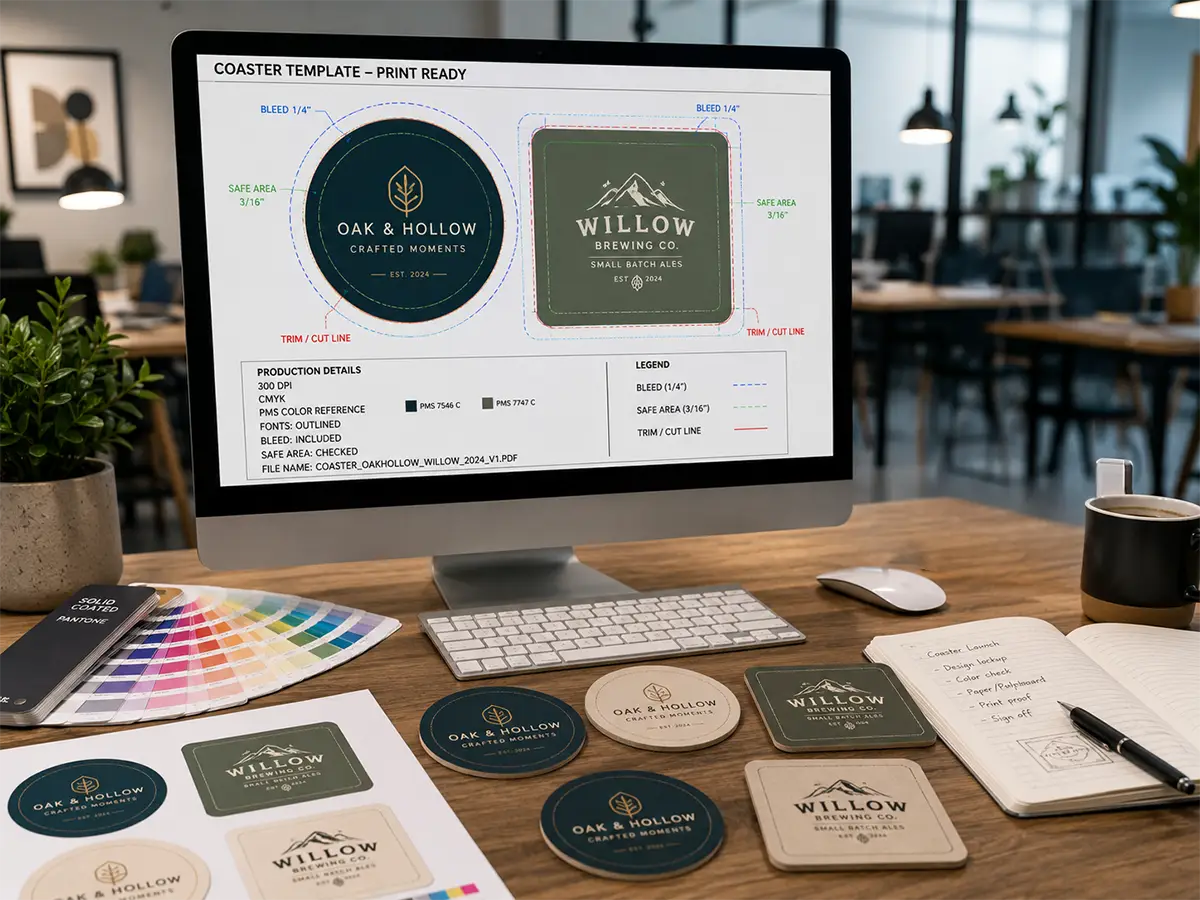
Proper bleed, trim, and safe zones ensure artwork prints edge to edge without unintended white borders. Correct color modes and resolution settings help colors reproduce accurately on press.
When templates are used correctly, what you approve on screen is much closer to what arrives on the table.
What Makes a Coaster Template Print-Ready
Not all templates are created equal. A truly print-ready coaster template includes more than just the right shape.
Bleed, Trim, and Safe Zones Explained
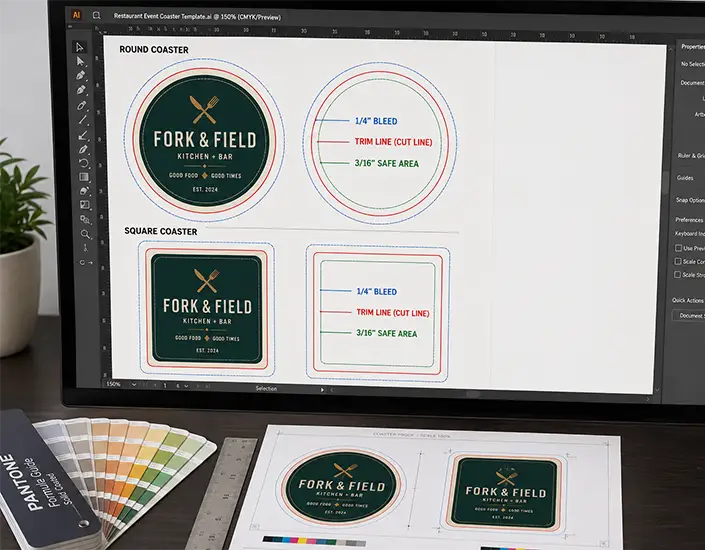
Bleed is the area that extends beyond the final cut size of the coaster. This extra space allows printers to trim the piece cleanly without leaving unprinted edges. A good coaster template clearly shows the bleed area so designers know where background colors and images should extend.
The trim line indicates the final size of the coaster. Anything outside this line will be cut off.
Safe zones protect critical content like logos and text. Keeping important elements inside the safe area ensures they are not trimmed off or pushed too close to the edge.
Templates that clearly label these zones help prevent common layout mistakes.
CMYK Color Setup and Resolution Standards
Professional printing uses CMYK color, not RGB. A proper coaster template download will already be set to CMYK, helping designers avoid unexpected color shifts during printing.
Resolution also matters. Print files should typically be set to 300 DPI to maintain sharp text and clean images. Templates built with correct resolution settings prevent blurry artwork and pixelation.
These technical details may seem minor, but they make a noticeable difference in the finished product.
File Formats Designers Actually Use
A usable coaster template should be available in industry-standard formats. Adobe Illustrator and PDF files are the most common for professional print work, with layered files that allow easy editing.
Clear naming conventions, editable layers, and locked guides all contribute to a smoother design process. When templates are built with designers in mind, projects move faster and with fewer errors.
Types of Coaster Templates You Can Download
Different campaigns call for different formats. A strong template library supports a range of coaster shapes and sizes without forcing teams to compromise.
Round Coaster Template (3.5" and 4")
Round coasters are the most widely used format in hospitality settings. A 3.5-inch round coaster is common for bars and restaurants, while 4-inch versions offer more space for messaging or detailed artwork.
Round coaster templates help designers balance text and visuals within a circular layout, which can be more challenging than working with straight edges. These templates are ideal for logos, simple promotions, and clean branding.
Square Coaster Template Options
Square coasters provide a more structured layout and often feel more modern. They work well for designs with text-heavy content, QR codes, or promotional messaging that benefits from straight alignment.
Square templates are popular for corporate events and conferences where readability and clarity are priorities.
Specialty Shapes: Hexagonal, Die-Cut, Custom
Specialty shapes stand out on the table. Hexagonal, scalloped, or fully custom die-cut coasters can reinforce brand personality and create a more memorable experience.
Templates for specialty shapes are especially valuable because they remove guesswork. Designers can experiment creatively while staying within print-safe boundaries. When paired with professionally printed coaster designs, these shapes become conversation starters rather than distractions.
At this stage, marketing teams often explore curated coaster designs to see how different formats translate into real-world use.
How to Design a Custom Coaster Using a Template
Once the right template is selected, the design process becomes straightforward. Templates provide structure, but they still leave room for creativity and strategic thinking. The goal is to turn a technical file into a custom coaster that supports your campaign objectives.
Step 1: Choose and Download the Template
Start by selecting the correct size and shape for your use case. Hospitality environments typically lean toward round formats, while events and corporate settings may benefit from square or specialty shapes.
A reliable coaster template download ensures the file is already sized correctly and includes all required print specifications. This eliminates uncertainty and reduces the risk of production issues later in the process.
Step 2: Apply Branding and Messaging
With the template open, add your logo, brand colors, and campaign message. Keep in mind that coasters are viewed at close range but often in low-light environments. Contrast and readability matter.
Strong designs focus on one primary message rather than trying to communicate everything at once. Whether it is a logo, QR code, or call to action, clarity drives effectiveness.
This is where a custom coaster becomes more than a functional item. It turns into a brand touchpoint that stays in front of the customer for the entire experience.
Step 3: Review Print Guidelines Before Upload
Before finalizing the file, review all print guidelines carefully. Confirm that background colors extend into the bleed area and that important content stays within safe zones.
Double-check color mode, resolution, and linked images. Small technical issues can have a big impact once thousands of coasters are printed.
Templates simplify this step, but human review is still essential.
Step 4: Upload for Production with Confidence
Once the file is reviewed, it is ready for production. A properly prepared template reduces questions from the printer and speeds up approval.
Marketing teams that follow this process consistently experience fewer delays and better results. The finished piece reflects both strong design and professional execution.
Common Mistakes to Avoid When Using Coaster Templates
Templates are powerful tools, but they still require thoughtful use. Avoiding a few common mistakes can protect both budget and brand perception.
Ignoring Bleed and Safe Areas
One of the most frequent errors is placing text or logos too close to the trim line. Even slight shifts during cutting can affect the final result.
Templates clearly mark these areas for a reason. Respecting them ensures clean, polished output.
Using RGB or Low-Resolution Artwork
Designs created for screens do not always translate well to print. RGB colors can shift unexpectedly, and low-resolution images can appear soft or pixelated.
Print-ready templates help avoid these issues, but designers must still verify that all assets meet professional standards.
Overcrowding Small Print Spaces
A coaster is a compact format. Trying to include too much information often weakens the message.
Effective designs focus on one idea and support it visually. White space is not wasted space. It improves readability and overall impact.
Coaster Templates in Action: Real Marketing Use Cases
Templates are most valuable when they support real-world marketing goals. Across industries, teams use coaster templates to deliver consistent, measurable results.
Corporate Events and Conferences
At conferences and trade shows, coasters serve as subtle but effective branding tools. Placed in lounges, networking areas, or hospitality zones, they reinforce brand presence without interrupting conversation.
Templates allow teams to quickly adapt designs for different events while maintaining a consistent look. This efficiency is especially valuable for organizations attending multiple shows each year.
Breweries and Taprooms
Breweries use coasters as part of the customer experience. From promoting seasonal releases to encouraging social sharing, coasters are always within reach.
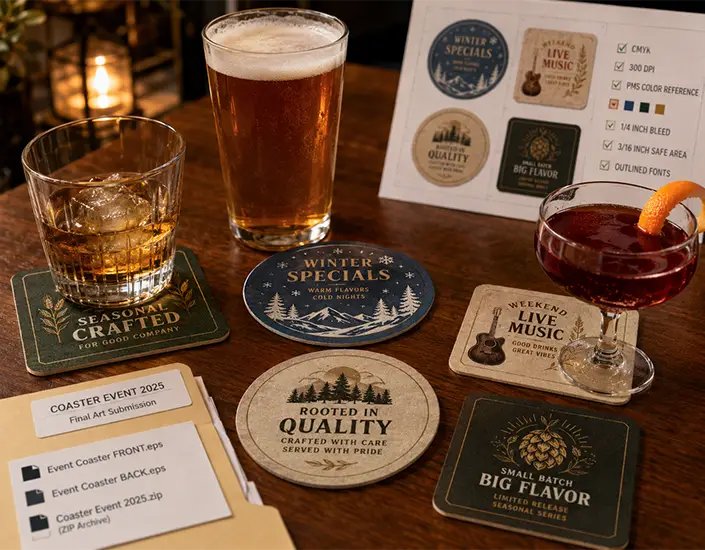
Templates make it easy to rotate designs, test new messaging, and maintain a cohesive visual identity across taprooms. When paired with professionally printed drink coasters, the result feels intentional and high quality.
Hospitality, Hotels, and Restaurants
Restaurants and hotels rely on consistency across locations. Coasters support branding, promotions, and guest engagement without adding clutter.
Templates help marketing teams roll out updates efficiently. Whether launching a new menu or promoting a limited-time offer, designs stay on brand and print correctly every time.
Many hospitality brands use templates as part of a broader system that includes menus, table tents, and signage. This approach strengthens the overall experience.
From Template to Table: Turning Design into a Physical Asset
Design is only one part of the equation. Production choices influence how the final piece performs in real environments.
Why Professional Printing Matters
Professional printing ensures color accuracy, clean cuts, and consistent thickness. These details affect how the coaster feels and how long it lasts.
A well-printed coaster reflects positively on the brand behind it. It signals attention to detail and quality.
When designs are built using templates and printed professionally, marketing teams avoid surprises and deliver reliable results.
Material Choices and Thickness Considerations
Material selection plays a role in both durability and perception. Pulpboard thickness, finish, and absorbency all affect performance.
Templates account for size and shape, but material choices bring the design to life. Teams producing custom coasters often consider thickness options to match their environment, whether that is a high-volume bar or a formal event setting.
Final Thoughts: From Coaster Template Download to Custom Coaster Impact
A coaster template download is more than a design convenience. It is a tool that supports speed, consistency, and professional results across marketing efforts.
For teams balancing creativity with operational efficiency, templates remove friction without limiting flexibility. They allow designers to focus on messaging and brand experience while ensuring files are production-ready.
When paired with thoughtful design and quality printing, templates help transform a simple item into a meaningful marketing asset. The path from screen to table becomes smoother, faster, and more reliable.
Share: